Hosted Google Sheets MCP server

Connect your AI assistant to Google Sheets

Give Codex, Claude, Gemini, and other MCP-compatible assistants controlled tools to discover your Sheet Best connections, read rows, and make approved updates—without building or hosting another integration.

New to Sheet Best? Start a 30-day trial. No credit card required.

Sheet Best MCP

One hosted MCP endpoint

Ready

Your Google Sheet

Live Sheet Best connection

Assistant tools

List connections
Check permissions
Read rows
Update rows
Bearer tokenMethod awareQuota aware

Why MCP, and why Sheet Best?

Give the assistant the tools, not another integration project

A REST API is ideal when your application already knows which request to make. MCP is different: the assistant can discover the available operations, choose the right tool, and use it as part of the work you asked it to do.

Skip the wrapper code

Point your assistant at a ready endpoint

Connect a compatible client to the hosted Sheet Best MCP endpoint. The assistant discovers the Sheet Best tools and their inputs, so you do not have to turn every API call into a custom integration first.

Skip the server operations

Keep control without self-hosting

A generic Google Sheets MCP server still leaves hosting, authentication, and access control with you. Sheet Best hosts the server and applies your connection’s allowed methods, Google permissions, quotas, and access rules.

Build end to end

Build the app and its data workflow together

While your assistant builds a website, app, or automation, it can also connect the Google Sheet behind it, read the data, add records, and make controlled updates through the same Sheet Best tools.


Use the REST API

For application code and predictable requests that you define.

Use Sheet Best MCP

For assistant workflows where the model needs to discover and choose the right operation.

From sheet to assistant

Three steps, one controlled connection

Your Google Sheet stays the source of truth. Sheet Best provides the secure tool layer your assistant can understand.

  1. 01

    Connect your sheet

    Paste a Google Sheet URL into Sheet Best and keep using the same connection as your REST API.

  2. 02

    Enable MCP securely

    Turn on MCP support in settings, generate a dedicated token, and store it in your client’s secure configuration.

  3. 03

    Ask the assistant

    Add the hosted endpoint, list your connections, check permissions, and start with a small read before approving writes.

Tools assistants can understand

Ask for the outcome, not the integration code

The assistant discovers a defined set of Sheet Best operations and chooses the appropriate tool. It does not receive unrestricted spreadsheet access.

Discover connections

List the Sheet Best connections available to your account and select the right sheet.

Read the rows you need

Filter, query, inspect, and retrieve spreadsheet rows through structured tools.

Make controlled changes

Add, update, replace, or delete rows only when the connection allows that method.

Check before acting

Inspect permissions, request limits, and sheet information before approving a change.

Sheet Best MCP tools available to an AI assistant, including connection discovery and Google Sheets row operations.
The tool list exposes connection management and permitted sheet operations in a form the assistant can call directly.

Your controls remain authoritative

The assistant can only use what you allow

MCP is opt-in. Account-level access and per-connection availability are separate safeguards, while existing Sheet Best method restrictions and plan limits continue to apply.

  • Disable MCP support without destroying the stored token.
  • Enable or disable individual Google Sheet connections.
  • Block write or delete operations through allowed methods.
  • Rotate or revoke the MCP credential from settings.
Review connections and tools
Sheet Best connection page with per-connection MCP access and direct endpoint controls.
Allowed HTTP methods controlling which Google Sheets read and write actions the MCP server can perform.
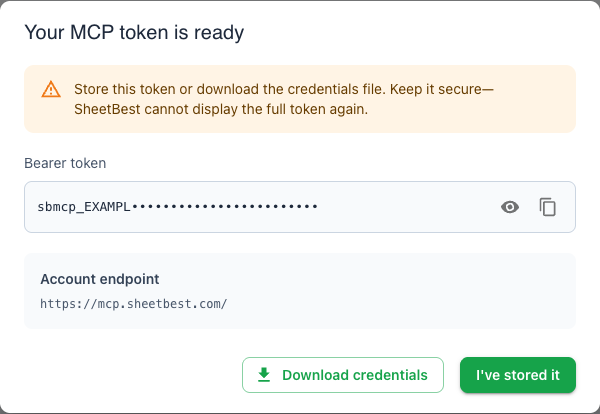
One-time Sheet Best MCP token dialog showing the hosted endpoint, download action, and the full dialog shadow.

Dedicated bearer authentication

A separate token for assistant access

The full MCP token is shown only once. Sheet Best stores its cryptographic hash, and replacing a token revokes the previous credential.

Keep the token in your MCP client’s secure configuration—never in a prompt, URL, screenshot, or source repository.
Read the security and token overview

Limited-time availability

MCP is Personal and up—but right now, everyone can try it

For a limited time, MCP is available to every Sheet Best user, including Tiny. We will announce the timing before introductory access changes.

Frequently asked questions

What to know before connecting

What is Sheet Best MCP?

Sheet Best MCP is a hosted Model Context Protocol server that gives compatible AI assistants controlled tools for discovering your Sheet Best connections and reading or updating Google Sheets rows.

Which AI assistants can connect to Sheet Best MCP?

Any client that supports remote Streamable HTTP MCP servers with bearer-token authentication can connect. Current examples include Codex, Claude, and Gemini-compatible tooling.

Does the assistant get unrestricted access to my Google Sheets?

No. MCP is opt-in at the account level, each connection can be enabled or disabled independently, and Sheet Best continues to enforce allowed methods, Google permissions, quotas, origin rules, IP rules, and plan limits.

How does authentication work?

You generate a dedicated MCP bearer token in Sheet Best settings. The complete token is displayed once, and Sheet Best stores only its cryptographic hash. Keep the token in your MCP client’s secure configuration, never in prompts, URLs, screenshots, or source code.

Can I use MCP and the Sheet Best REST API together?

Yes. Both interfaces use the same Sheet Best connection and Google Sheet. MCP is useful for interactive assistant workflows, while the REST API remains available for application code and predictable requests.

Which Sheet Best plans include MCP?

MCP is normally available on Personal and higher plans. For a limited time, every Sheet Best user can try it, including Tiny users.

Give your assistant a safe path to your sheets

Connect a Google Sheet, generate your MCP token, and make the first permission-aware request in minutes.